Platform overview
One place to run the clinic day
From registration to consultation, dispensing, billing and follow-up, HealthOS keeps your team working from the same reliable information.
Built for private clinics and small groups that see insured ("panel") patients, run an in-house pharmacy, and care about who can see what.
Patient journey
A clear path for every visit
Everyone sees the same story: who is waiting, who is in the room, what was prescribed, what is ready to collect, and what is still owed.
- 1Check-in
Register or find the patient
- 2Wait
A clear queue in the right order
- 3See the doctor
Notes, prescriptions and letters in one visit
- 4Collect medicine
Pharmacy prepares and verifies each item
- 5Pay
Cash, transfer, card, or company panel
- 6Review
Sales, panels, and follow-ups in one place
- Step 1Check-inRegister or find the patient
- Step 2WaitA clear queue in the right order
- Step 3See the doctorNotes, prescriptions and letters in one visit
- Step 4Collect medicinePharmacy prepares and verifies each item
- Step 5PayCash, transfer, card, or company panel
- Step 6ReviewSales, panels, and follow-ups in one place
Capabilities
What you get
Practical tools for the work clinic owners, managers and staff handle every day.
Patients, appointments & queue
Keep patient registration and records together, manage appointments and queues, and run a patient-facing Queue TV from the same workspace.
Consultation & documents
Keep consultation notes, prescriptions, medical certificates, referrals and follow-up actions attached to the patient visit.
Dispensing & Medicine Counter
Verify dispensed items, print medicine labels and support direct counter sales without creating an unnecessary consultation.
Billing, receipts & payments
Record cash, card, transfer and panel payments, issue receipts and keep outstanding amounts visible for follow-up.
Direct Company, panel & TPA
Manage panel companies, Direct Company billing, TPA claims, invoices, partial payments and receivables without rebuilding the ledger elsewhere.
Inventory & purchasing
Track batches, expiry dates and adjustments, then manage suppliers and purchase orders as stock requirements change.
Workforce operations
Coordinate attendance schedules, leave and exceptions, with workforce analytics for a clearer view of clinic coverage.
Owner & financial dashboards
Review owner summaries, revenue, profit, outstanding payments and operational performance from focused dashboards.
CSV-based Migration Center
Prepare and validate CSV imports for patients, inventory and panel companies, with migration history for clearer onboarding.
MyInvois e-Invoice operations
Support individual buyer, monthly consolidated, Direct Company/panel and TPA claim e-Invoice workflows through a controlled rollout.
WhatsApp workflows
Use manual reminder workflows, with clinic-owned automation available after clinic connection, Meta template approval and production activation.
Available now
Core patient, queue, consultation, dispensing, billing and receipt workflows are available now. Plan-specific capabilities include panel and TPA operations, advanced inventory, workforce tools, dashboards and the Migration Center.
Requires clinic setup and activation
MyInvois e-Invoice workflows are available through a controlled rollout and require clinic-specific configuration, credentials, authorisation, testing and production activation. WhatsApp automation also requires a clinic connection and approved Meta templates.
On the roadmap
MyKad reading and laboratory workflows are not currently included. Payroll, a general ledger and AI clinical assistance also remain outside the current product scope.
Controlled MyInvois rollout
Once a clinic has completed onboarding and production activation, HealthOS can support the following e-Invoice operations:
- Individual buyer e-Invoices
- Monthly consolidated e-Invoices for eligible self-paid receipts
- Direct Company and panel e-Invoices
- TPA claim e-Invoices
- MyInvois submission-status monitoring
- QR codes and official validation links
- Cancellation within the permitted MyInvois window
- Credit notes linked to the original validated invoice
- Automatic retry and backoff for temporary failures
- An action-required queue with operational alerts
Availability is not automatic for every customer. Configuration, credentials, authorisation, testing and production activation must be completed for each clinic.
Screens
Inside the workspace
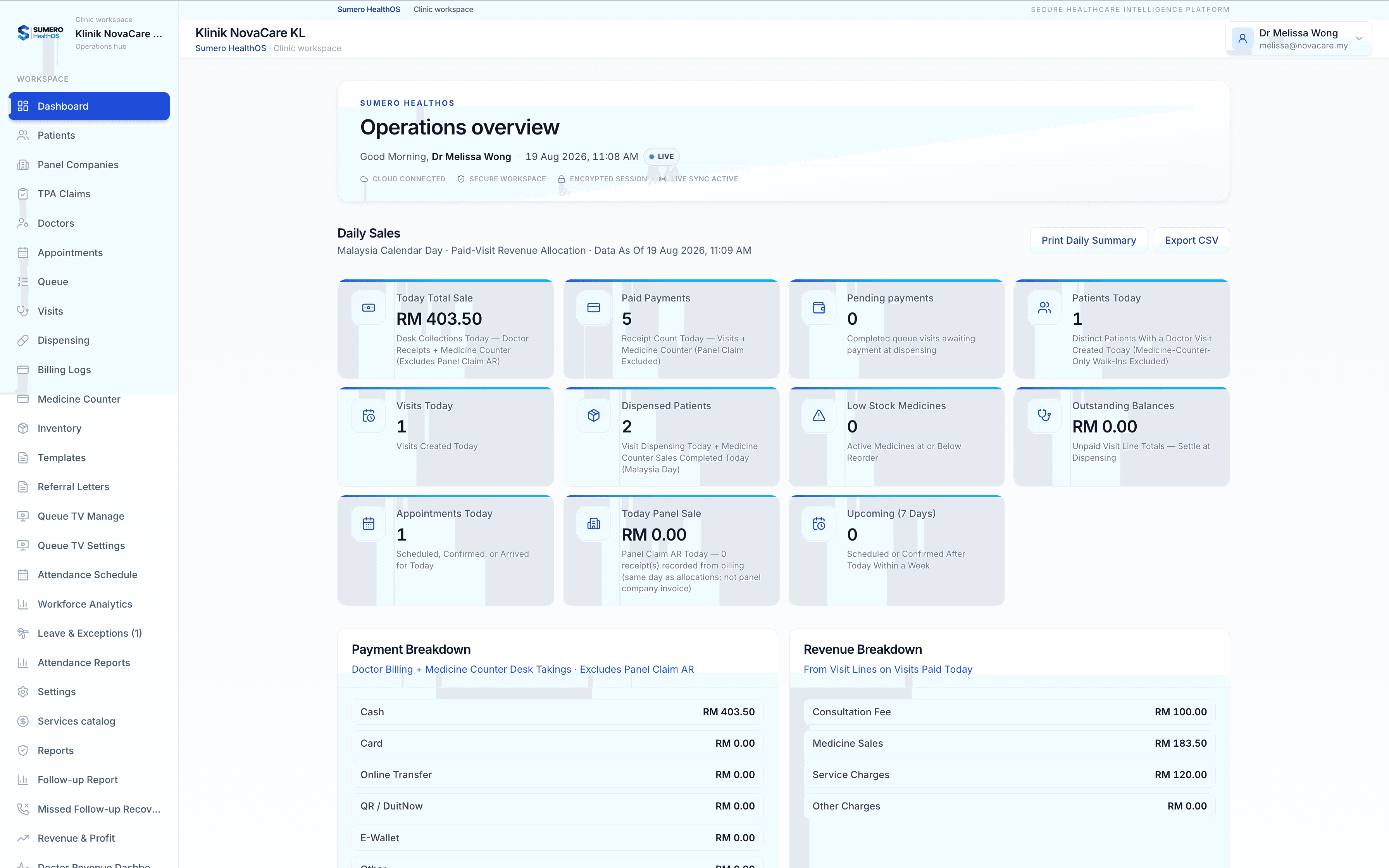
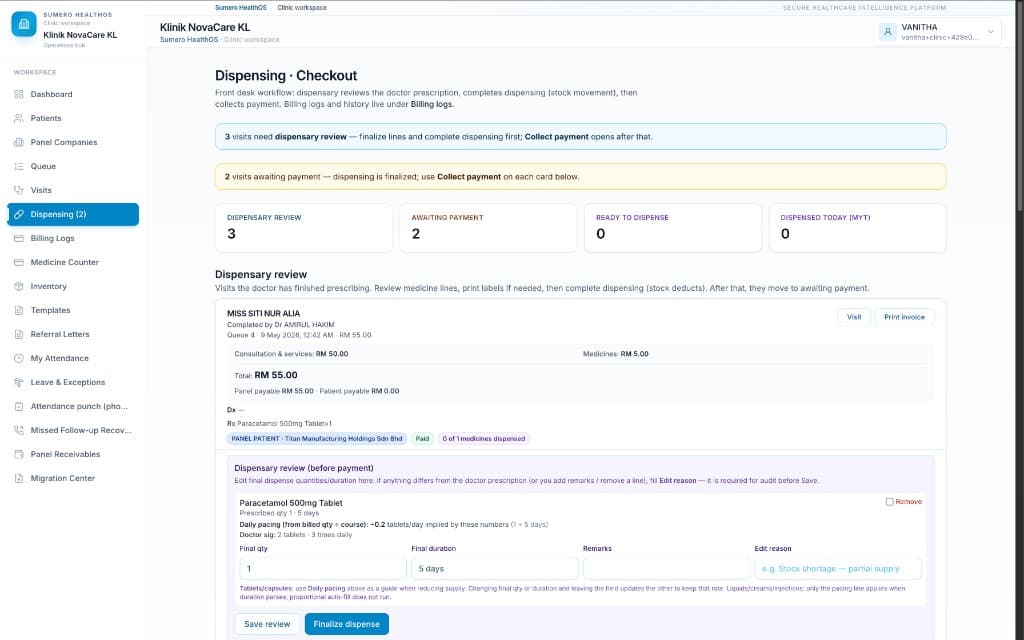
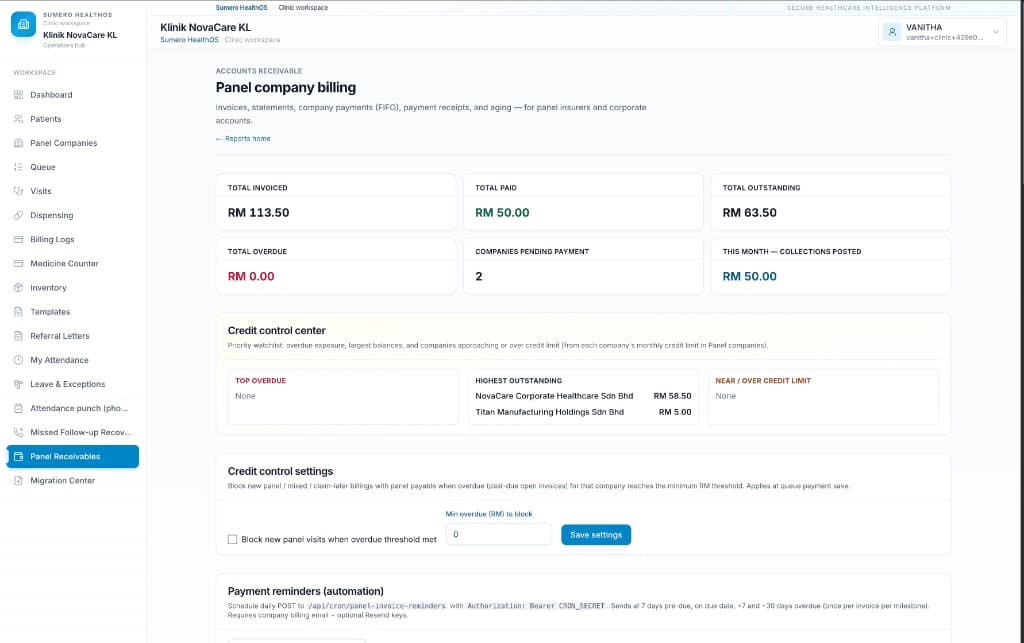
These are actual HealthOS screens. They show three common areas of work: daily clinic activity, the pharmacy handover and panel receivables.
Trust
Clear and practical security
Straightforward answers to the security questions clinic owners usually ask before going live.
Your clinic, your boundary
Patient and money data stay scoped to your organisation. Other customers on the platform never see it.
Secure access for busy teams
Password rules and account lockouts help protect busy reception areas without making daily access unnecessarily difficult.
A paper trail when it matters
When something sensitive changes, you can trace who did what. That helps with panels, audits, and disputes.
Multi-branch
Planning for multiple branches
HealthOS can support a structured branch-by-branch rollout under a Group agreement. Cross-branch reporting, shared-data rules and central operating requirements are confirmed during solution design before contracting.
Tell us how your clinic runs today, and we will show the screens that map to your reception, doctors, pharmacy, and accounts team.
Plans start at RM149/month. View pricing